
Both useEffect and useLayoutEffect run after React commits changes to the DOM. The important difference is whether the Effect blocks the browser from painting the updated screen.
In most cases, useEffect is the right choice. Reach for useLayoutEffect only when you must measure the DOM and apply the result before the first paint.
The difference at a glance
| Comparison | useEffect | useLayoutEffect |
|---|---|---|
| Primary purpose | Synchronize a component with an external system | Measure and correct layout before paint |
| Typical timing | After commit, usually after paint | After commit, before paint |
| Browser paint | Does not block it | Blocks it until the Effect and its state updates finish |
| Common examples | Event listeners, timers, network connections, third-party widgets | Tooltip placement, element measurement, scroll position correction |
| SSR | Does not run | Does not run, and the server has no layout information |
| Default choice | Start here | Use only for visual work that requires it |
Both Hooks follow the same dependency and cleanup rules. When a dependency changes, React runs the previous cleanup before running setup with the new values. The final cleanup runs when the component is removed from the DOM.
Render, commit, and paint
To understand the timing, it helps to separate React's render and commit phases from the browser's paint step.
- Render: React calls your components and calculates what should appear on screen.
- Commit: React applies the result to the DOM.
- Paint: The browser draws the updated DOM and styles on screen.
With Effects included, the simplified sequence looks like this:
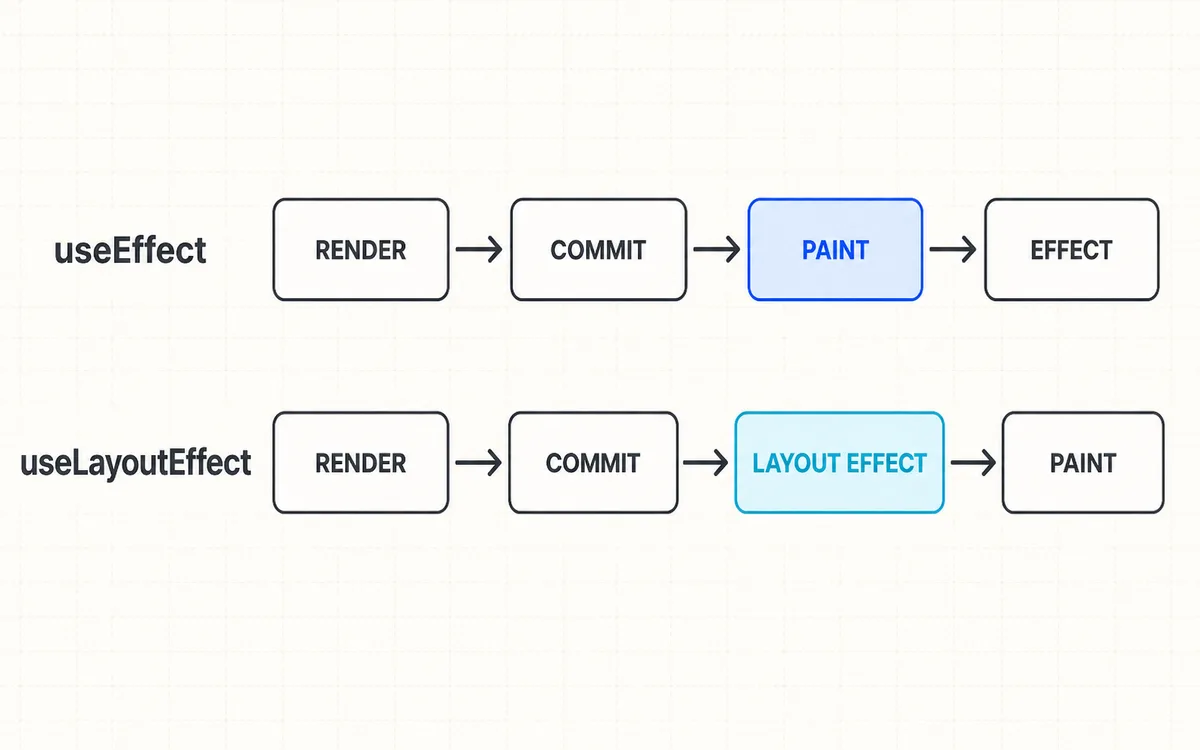
Because useLayoutEffect runs after the DOM has been updated, it can read an element's size and position. React finishes the Effect and any state updates it schedules before allowing the browser to paint.
It is not quite accurate to say that useEffect always runs after paint. For an Effect that was not caused by an interaction, React usually lets the browser paint first. An Effect triggered by an interaction such as a click may run before paint. Rather than memorizing every timing detail, ask one practical question: must this work finish before the next paint?
It is also misleading to reduce the difference to “useLayoutEffect is synchronous and useEffect is asynchronous.” Their setup functions do not become inherently synchronous or asynchronous. What matters is where React runs the Effect relative to commit and paint, and whether that work blocks painting.
When to use useEffect
Use useEffect to synchronize a component with a system outside React. Browser events, timers, network connections, and third-party widgets all fall into this category because React does not manage them directly.
The component below listens for the Escape key. When the component unmounts or onEscape changes, the cleanup removes the previous listener to avoid duplicate calls and memory leaks.
import { useEffect } from "react";

type PropsWithEscapeKeyListener = {
  onEscape: () => void;
};

export function EscapeKeyListener({ onEscape }: PropsWithEscapeKeyListener) {
  useEffect(() => {
    function handleKeyDown(event: KeyboardEvent) {
      if (event.key === "Escape") onEscape();
    }

    window.addEventListener("keydown", handleKeyDown);

    return () => {
      window.removeEventListener("keydown", handleKeyDown);
    };
  }, [onEscape]);

  return null;
}
There is no reason for this work to finish before the next paint. Replacing useEffect with useLayoutEffect would produce the same result while blocking the browser unnecessarily.
You can also fetch data from the client inside useEffect. In a framework such as Next.js, however, consider server-side data fetching or a cache-aware client library first. If an Effect owns the request, its cleanup should prevent an outdated response from overwriting newer state after the component unmounts or a dependency changes.
When useLayoutEffect is necessary
Use useLayoutEffect when a DOM measurement must affect the very first paint. Positioning a tooltip or popover is a common example.
The example below measures both the target and the tooltip. It places the tooltip above the target when there is enough room and below it otherwise.
import type { ReactNode } from "react";
import { useLayoutEffect, useRef, useState } from "react";

type PropsWithTooltip = {
  children: ReactNode;
  target: HTMLElement | null;
};

type Position = {
  left: number;
  top: number;
};

export function Tooltip({ children, target }: PropsWithTooltip) {
  const tooltipRef = useRef<HTMLDivElement>(null);
  const [position, setPosition] = useState<Position | null>(null);

  useLayoutEffect(() => {
    if (!target || !tooltipRef.current) return;

    const targetRect = target.getBoundingClientRect();
    const tooltipRect = tooltipRef.current.getBoundingClientRect();
    const top = targetRect.top - tooltipRect.height - 8;

    setPosition({
      left: targetRect.left + (targetRect.width - tooltipRect.width) / 2,
      top: top >= 8 ? top : targetRect.bottom + 8,
    });
  }, [target]);

  return (
    <div
      ref={tooltipRef}
      role="tooltip"
      style={{
        position: "fixed",
        left: position?.left ?? 0,
        top: position?.top ?? 0,
        visibility: position ? "visible" : "hidden",
      }}
    >
      {children}
    </div>
  );
}
React renders twice before the result appears on screen:
- It commits the tooltip before its position is known.
useLayoutEffectmeasures the target and tooltip.- The Effect stores the result in state and immediately triggers another render.
- The browser paints only the tooltip in its corrected position.
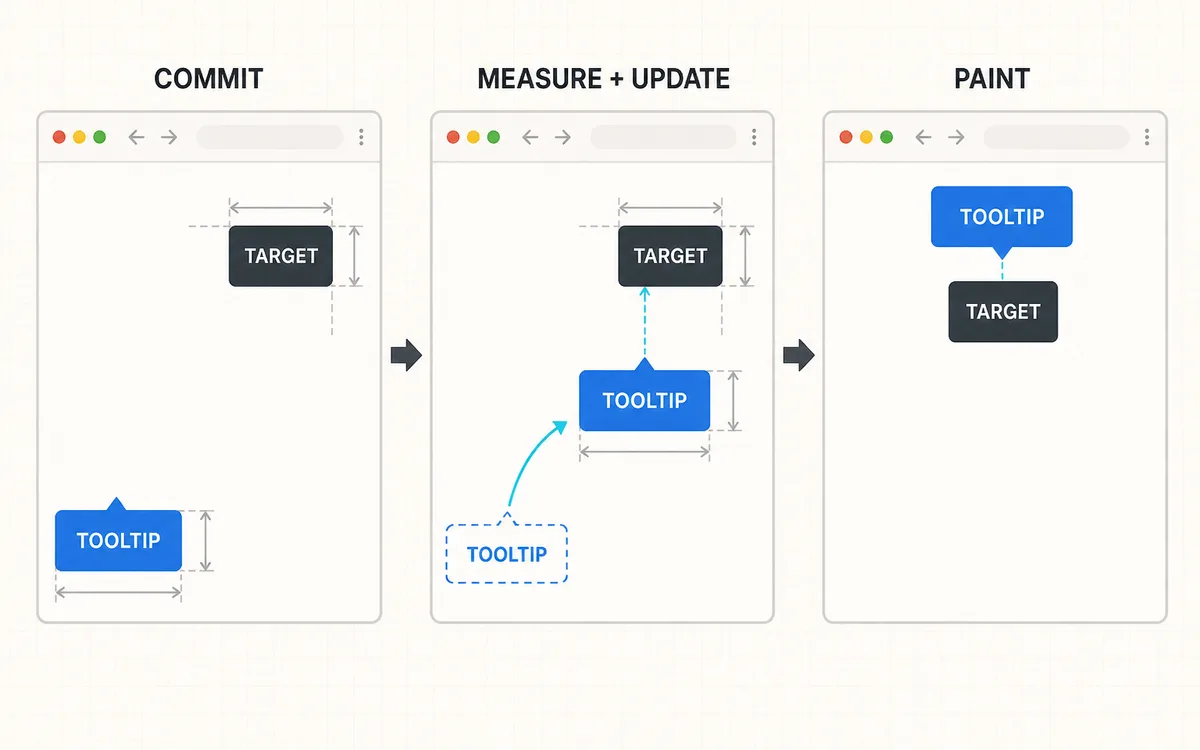
Moving the same code into useEffect may allow the browser to paint the initial position first. Once the measurement finishes, the tooltip jumps to the correct position and can appear to flicker.
If CSS can handle the placement, or if the first-frame difference is not visible, useEffect is enough. Reading from the DOM does not automatically require useLayoutEffect.
This example calculates only the initial position to keep the comparison focused. A production tooltip must also respond to viewport resizing, scrolling, and content-size changes. In real applications, consider a proven positioning library and browser APIs such as ResizeObserver.
Why useLayoutEffect should be rare
Code inside useLayoutEffect, including any state update it schedules, blocks the browser from painting. Repeatedly measuring a large DOM tree or running expensive calculations can delay the initial screen and make interactions feel sluggish.
useLayoutEffect(() => {
  const startedAt = performance.now();

  while (performance.now() - startedAt < 1000) {
    // The browser cannot paint until this work finishes.
  }
}, []);
Moving this calculation to useEffect does not make the calculation itself faster. Keep pure calculations needed for rendering in the render phase, and consider memoization or a Web Worker for expensive work. Leave only the DOM measurement and the smallest necessary state update in useLayoutEffect.
Themes and redirects need different tools
Preventing a flash does not mean every style change or redirect belongs in useLayoutEffect.
Initial theme
In client-side rendering, changing a theme class inside useLayoutEffect can prevent a flash because the update happens before the first paint.
Server rendering is different. The browser may paint the server-generated HTML before JavaScript loads. Because useLayoutEffect runs during hydration, reading a theme from localStorage there cannot undo an initial frame that has already appeared.
A reliable initial theme can come from CSS prefers-color-scheme, a class placed on the server-generated HTML, or a small initialization script that runs before hydration. With a Static Export, the server cannot choose a theme per request, so a synchronous script in <head> can apply the DOM class first. Changes made after the user presses the theme button can be handled directly in the event handler.
Redirects and access control
Prefer the router or framework's routing layer for redirects. Access control, especially a decision based on authentication, must be enforced on the server or in middleware. Hiding the screen with useLayoutEffect and then navigating does not create a security boundary.
If navigation depends on information available only in the browser, combine useEffect with conditional rendering. Do not include sensitive content in the JSX while waiting for the redirect.
SSR and Next.js considerations
Neither useEffect nor useLayoutEffect runs on the server. In the Next.js App Router, a component that uses either Hook needs a Client Component boundary declared with "use client".
The server does not know the viewport or the rendered size of an element. If the initial HTML depends on a measurement from useLayoutEffect, the layout may move after hydration or produce a warning.
Work through the following options in order:
- Check whether CSS can solve the layout without measuring it.
- If the first screen does not need the measurement, switch to
useEffect. - Render interaction-only UI, such as an opened tooltip, on the client when it is needed.
- Reserve space for client-only UI with a fixed-size placeholder to reduce layout shift.
With Strict Mode enabled in development, React runs an extra setup → cleanup → setup cycle before the first production setup. If an Effect appears to run twice, first verify that its cleanup fully reverses the setup instead of changing Hooks.
A practical decision checklist
Use these questions before choosing an Effect:
- If the code does not synchronize with a system outside React, do you need an Effect at all?
- For event listeners, timers, network connections, and external widgets, use
useEffect. - If a DOM measurement must affect the first paint and a visible flicker actually occurs, use
useLayoutEffect. - Prefer CSS, the router, or framework features when they solve the problem without an Effect.
- If you choose
useLayoutEffect, keep it short and avoid repeated layout reads and writes.
The rule is simple: default to useEffect, and reserve useLayoutEffect for layout measurements that must finish before paint. Base the decision on whether the user can see an incorrect first frame and whether there is a clear reason to block browser paint.