
In August 2026, I rebuilt this blog around Next.js 16 and updated this article to reflect the production setup now in use.
The blog originally lived on Tistory. I moved it to GitHub Pages in 2025 because I wanted full control over the interface, URL structure, and content model without taking on the maintenance of an application server.
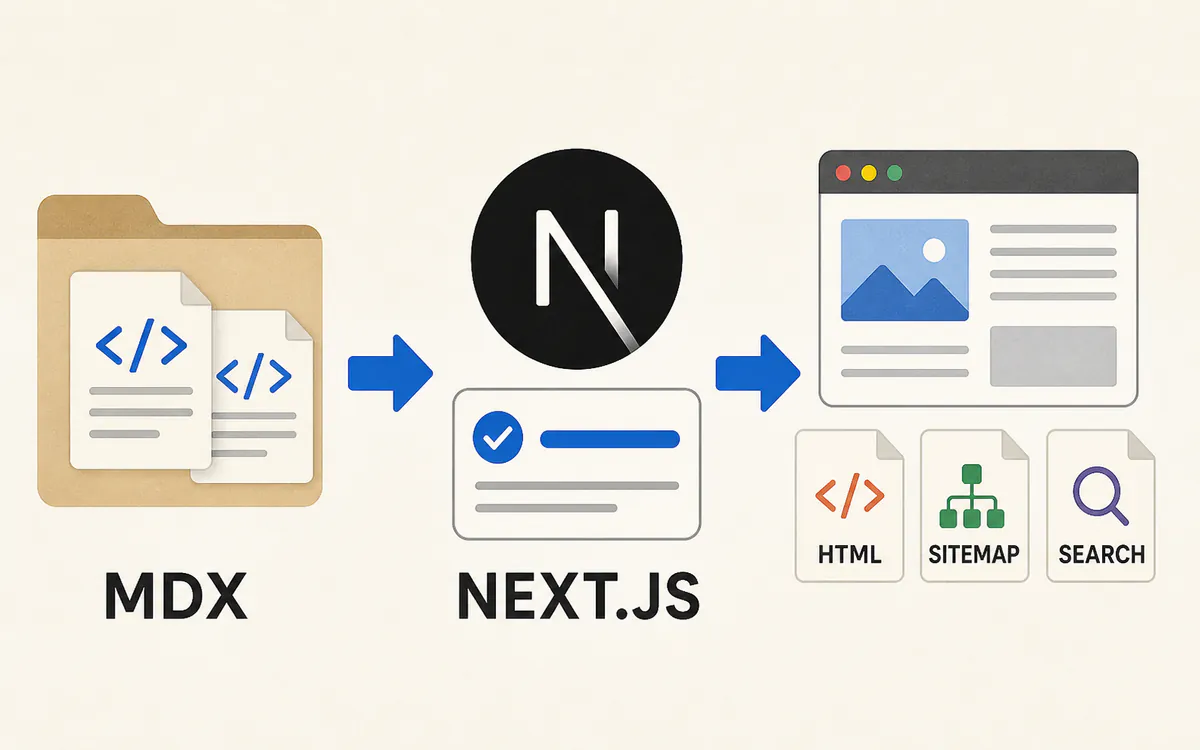
This article walks through the resulting architecture: generating static pages with Next.js 16 and the App Router, storing articles as MDX, building a client-side search index, producing the necessary SEO files, and deploying the final output to GitHub Pages.
Why GitHub Pages
A hosted blogging platform lets you focus on writing without thinking about servers or deployments. The trade-off is limited control over the presentation, URLs, and underlying content structure. Running your own server offers that flexibility, but it also adds cost and ongoing operational work that is difficult to justify for a personal blog.
GitHub Pages sits comfortably between those options. If a site can be delivered as HTML, CSS, and JavaScript, it can be hosted without an application server. The source code and article history can live together in Git, while the design and public URLs remain entirely under your control. That balance fits this blog well.
The limitations still matter. Features that require per-request server processing do not work with a static export. That includes authentication backed by cookies(), Server Actions, and ISR. Publishing or updating an article also requires a new build of the site. This is an acceptable constraint for a reading-focused blog whose content changes relatively infrequently.
Configuring Next.js 16 for Static Export
In Next.js 16, setting output: "export" makes next build generate the static site. The old next export command is no longer necessary. Once the build finishes, the files ready for GitHub Pages are available in the out directory.
The essential configuration for this blog looks like this:
import type { NextConfig } from "next";

const nextConfig: NextConfig = {
  output: "export",
  trailingSlash: true,
  pageExtensions: ["js", "jsx", "md", "mdx", "ts", "tsx"],
  images: {
    unoptimized: true,
  },
};

export default nextConfig;
With trailingSlash: true, a route such as /articles/example/ is written to out/articles/example/index.html. This keeps directory-style URLs consistent across the static host and makes it easier to apply the same convention to canonical URLs and internal links.
The default next/image optimization pipeline requires a server capable of processing image requests. This blog serves pre-optimized WebP assets instead, so images.unoptimized is enabled. If you use an external image service, a custom loader is another option.
The complete list of supported features and limitations is available in the Next.js Static Exports documentation.
Resolving dynamic routes at build time
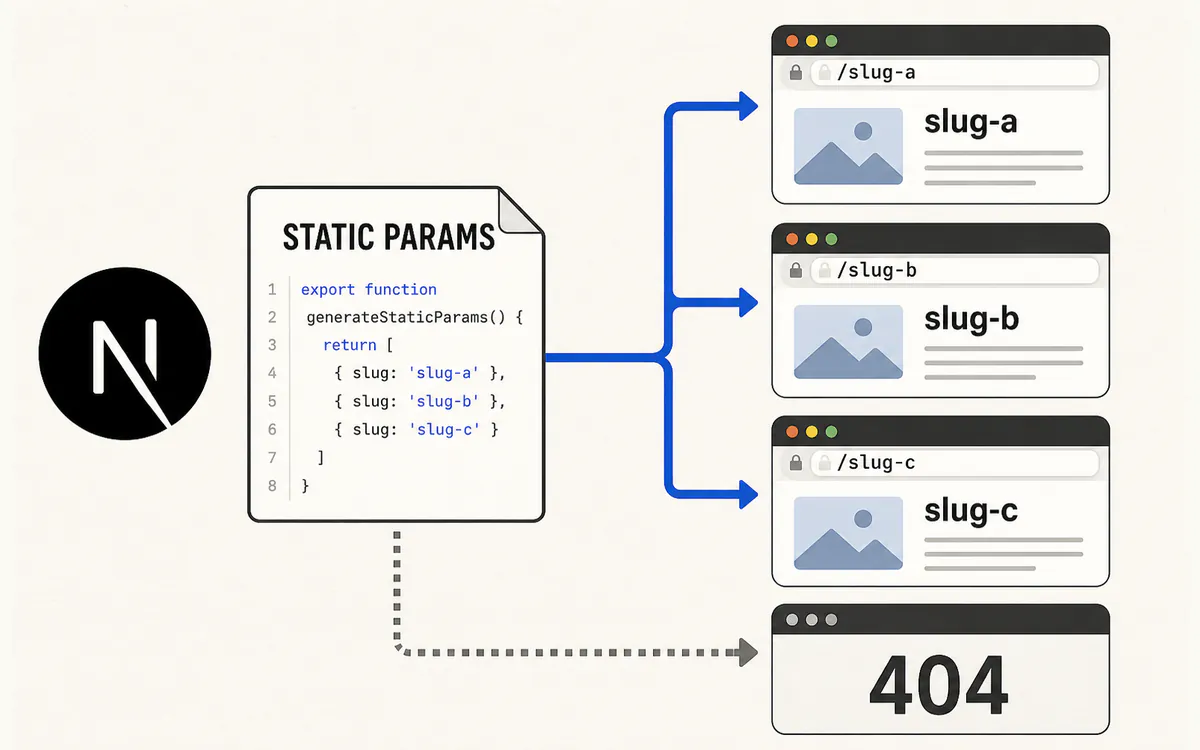
Article pages use a dynamic segment such as /articles/[slug]/. GitHub Pages has no server to resolve that value when a request arrives, so every public slug must be known before the build completes.
The localized article route can be reduced to the following example. Layout and metadata code have been left out to keep the relevant parts visible.
export const dynamicParams = false;

export function generateStaticParams() {
  return PREFIXED_LOCALES.flatMap((locale) =>
    getPublishedArticles(locale).map(({ slug }) => ({ locale, slug })),
  );
}

export default async function ArticlePage({
  params,
}: PageProps<"/[locale]/articles/[slug]">) {
  const { locale, slug } = await params;
  const articleDocument = getArticleDocument(slug, locale);

  if (!articleDocument?.metadata.isPublished) notFound();

  const { default: ArticleBody } = await import(`@/articles/${slug}/${locale}.mdx`);
  return <ArticleBody />;
}
generateStaticParams returns every published locale and slug combination, allowing Next.js to create each detail page ahead of time. Setting dynamicParams = false ensures that any combination outside that list becomes a 404. Generating both parameters from the child route also avoids creating placeholder pages for locales that do not have a translation.
See the generateStaticParams documentation for the complete routing behavior.
Managing Articles with MDX
Articles are stored as MDX files in the repository rather than in a database. Each article gets its own directory, with one file per available locale.
src/articles/
└── build-github-pages-blog-with-nextjs/
    ├── en.mdx
    ├── ja.mdx
    └── ko.mdx
A page is only generated when its translation file exists and is published. The site does not silently substitute the Korean article or expose an empty URL for a missing locale.
Each MDX file begins with frontmatter shared by the interface and the SEO layer.
id: article-001
slug: build-github-pages-blog-with-nextjs
locale: en
category: frontend
topics: [nextjs, react]
legacyPaths: []
title: Building a Static Blog with Next.js 16 and GitHub Pages
description: Summarize the article in one or two concise sentences.
publishedAt: 2025-01-07T20:13:19+09:00
modifiedAt: 2026-08-09T18:18:07+09:00
tags: [github-pages, static-export, mdx, seo]
isPublished: true
coverImage: /r/i/nextjs/1/thumbnail.webp
gray-matter reads the frontmatter, and a Zod schema validates the fields along with the allowed category and topic relationships. When author is omitted, the site-wide default is inserted during the build. Invalid metadata therefore fails the build instead of surfacing after deployment.
The @next/mdx, remark, and rehype pipeline
With the Next.js 16 App Router, @next/mdx allows local MDX files to be imported as React components. This project uses @next/mdx, @mdx-js/loader, and @mdx-js/react instead of next-mdx-remote. Shared rendering for body images and code blocks is defined in src/mdx-components.tsx.
The central part of the MDX configuration is shown below.
import createMDX from "@next/mdx";

const withMDX = createMDX({
  options: {
    remarkPlugins: ["remark-frontmatter", "remark-gfm"],
    rehypePlugins: [
      ["rehype-pretty-code", { theme: "github-dark-default", keepBackground: false }],
      "rehype-slug",
      "rehype-autolink-headings",
    ],
  },
});
Each tool has a focused role:
remark-frontmatterhandles frontmatter syntax in MDX files.remark-gfmadds GitHub Flavored Markdown features such as tables and strikethrough.rehype-pretty-codeand Shiki apply syntax highlighting during the build.rehype-slugandrehype-autolink-headingscreate anchor links for headings.- A custom rehype plugin generates the visible heading numbers.
Article headings begin at ##, and their numbers are not written into the source. The build generates the number and anchor, then reuses the same heading data for the table of contents and reading progress indicator. Language labels and copy controls are also attached to code blocks through shared components, so individual articles do not need to recreate that interface.
The overall setup follows the official Next.js MDX guide.
The Current URL Structure
The site distinguishes full articles from shorter notes. A category represents a broad area, while topics identify more specific subjects within it.
/articles/{slug}/
/categories/{category}/
/topics/{topic}/
/tags/{tag}/
/notes/{slug}/
Korean uses the domain root. English and Japanese pages add /en/ and /ja/ respectively. Translations keep the same article ID and slug, while each page receives its own canonical URL and is connected to the other published languages through reciprocal hreflang links.
Older paths already known to search engines, such as /blog/nextjs/1/, remain available as compatibility routes that point to the current canonical page. Once an article is published, its slug stays stable even if the title or category changes. Canonical URLs, the sitemap, and internal links only use the current public path.
Search and SEO on a Static Site
A static site can still provide capable search and complete SEO metadata. The difference is that the work must happen either during the build or in the browser because there is no request-time application server.
Indexing article content with Pagefind
Pagefind powers the site search. After Next.js writes the out directory, Pagefind reads the completed HTML and builds an index from article and note pages.
{
  "scripts": {
    "build": "next build && pnpm search:index && pnpm verify:links && pnpm verify:seo && pnpm verify:search",
    "search:index": "pagefind --site out"
  }
}
The search engine and index are loaded only after someone enters a query. This keeps search-specific JavaScript out of the initial page while still indexing titles, summaries, categories, topics, tags, and body text. Search results do not have their own public URLs, so they do not introduce new canonical or sitemap entries.
Pagefind also separates its indexes by the document's lang attribute. English, Japanese, and Korean content can therefore be indexed independently without mixing language-specific results.
Metadata and discovery files
Article frontmatter drives the page title, description, canonical URL, Open Graph metadata, and Twitter Card. Each detail page also contains BlogPosting and breadcrumb structured data.
Every translation uses a self-referencing canonical URL. Only translations that are actually published are linked with reciprocal hreflang values. For this article, the Korean, English, and Japanese pages reference one another; no URL is invented for an unavailable locale. This makes the language relationship explicit without treating one translation as the canonical copy of another.
Next.js metadata routes generate the remaining discovery files as static output:
/sitemap.xmllists public articles, notes, categories, topics, tags, localized home pages, and app pages./robots.txtadvertises the sitemap and feed locations to crawlers./feed.xmlprovides an Atom feed./rss.xmlprovides an RSS 2.0 feed.
The sitemap uses each document's real modifiedAt value instead of the build time. At the end of the build, dedicated checks verify internal links, canonical URLs, structured data, sitemap and feed entries, and the Pagefind index before anything is deployed.
Deploying to GitHub Pages
Once pnpm build succeeds, only the out directory needs to be published. In the repository settings, GitHub Pages is configured to use GitHub Actions as its source. The workflow uploads the output with actions/upload-pages-artifact and publishes it with actions/deploy-pages.
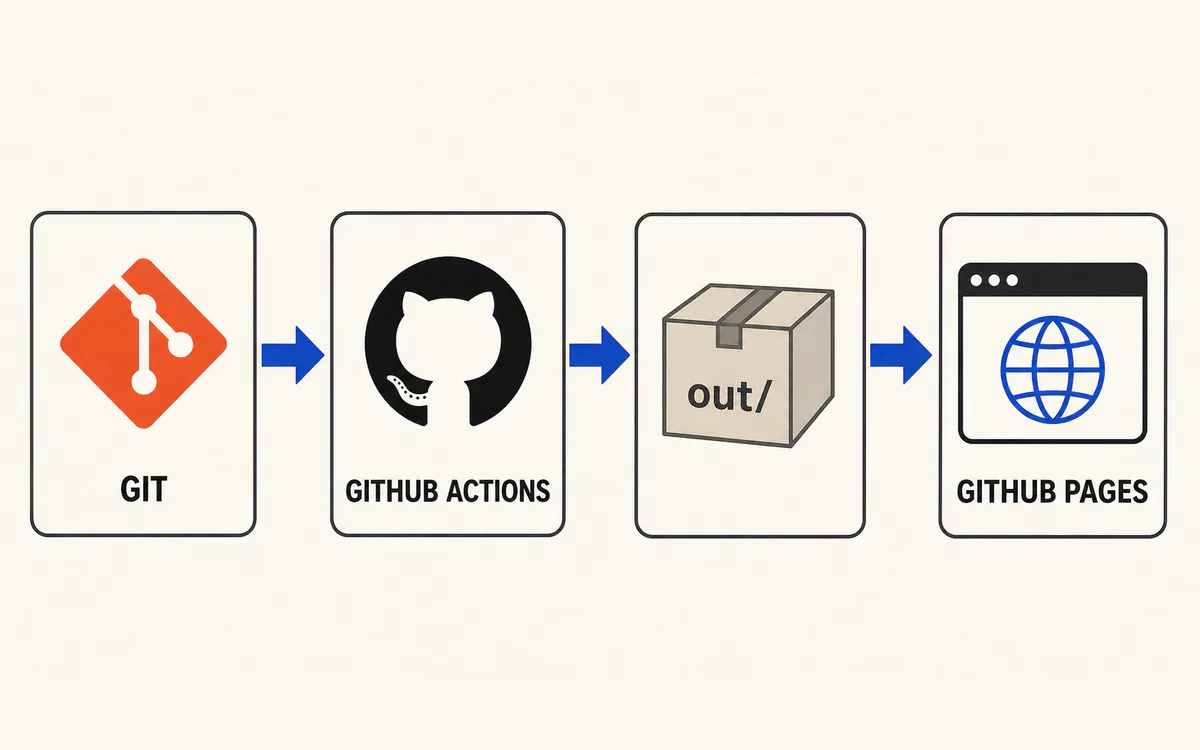
The essential workflow looks like this:
name: Deploy blog

on:
  push:
    branches: [main]
  workflow_dispatch:

permissions:
  contents: read
  pages: write
  id-token: write

jobs:
  build:
    runs-on: ubuntu-latest
    steps:
      - uses: actions/checkout@v6
      - uses: pnpm/action-setup@v6
        with:
          version: 10.23.0
          run_install: false
      - uses: actions/setup-node@v6
        with:
          node-version: 24
          cache: pnpm
      - uses: actions/configure-pages@v6
      - run: pnpm install --frozen-lockfile
      - run: pnpm build
      - uses: actions/upload-pages-artifact@v5
        with:
          path: ./out
          include-hidden-files: true

  deploy:
    needs: build
    runs-on: ubuntu-latest
    environment:
      name: github-pages
      url: ${{ steps.deployment.outputs.page_url }}
    steps:
      - id: deployment
        uses: actions/deploy-pages@v5
The deployment job needs both pages: write and id-token: write. Keeping build and deployment as separate jobs ensures that publishing begins only after the build and its verification steps have completed. GitHub's custom workflow documentation for Pages covers the remaining settings.
When This Architecture Is a Good Fit
Static Export with Next.js 16 and GitHub Pages is not the right choice for every site. A project that depends on request-time authentication, server-side data processing, Server Actions, or ISR is better served by a host with a server runtime. Images also need to be optimized ahead of time or delegated to an external service.
For a reading-focused personal blog, however, the model has clear advantages. Articles and interface code live in one repository, every public path can be verified during the build, and the deployed files can remain online without a dedicated server. This blog keeps essential dynamic behavior in the browser while producing everything search engines need as static output.
The most important decision was not choosing Next.js itself, but designing around the constraints of GitHub Pages from the beginning. Separating the pages generated by Next.js from the search index created after the build made it possible to add features without making the deployment architecture more complicated.